How to Use MediaPlayer10
MediaPlayer10 is a more powerful alternative to the standard Windows Media Player (WMP) that comes with most installations of Windows. Mediaplayer10 is based on VLC media player and has the ability to open and play more files types than WMP. MediaPlayer10 is compatible with popular video and audio formats, including MPEG, AVI, FLV, MKV, WMV, MOV, MP3, AIFF, AVI, and much more.
Mediaplayer10 also has the ability to play broken video files (half downloaded), as well as playing DVDs from your DVD drive. We hope you enjoy using Mediaplayer10 and give us feedback here: contact us page.
Mediaplayer10 Installation Process
In order to install MediaPlayer10 you need to open the setup file that was just downloaded. Double click on the file in your browser.

Mediaplayer10 Setup file in Chrome Browser
Windows will prompt you with a dialog asking you if you would like to install Media Player 10. Click Yes.
Mediaplayer10’s installation will then start. Here you have the chance to configure which folder you want to install Mediaplayer10 into, and what file types you want MediaPlayer10 to open up by default.
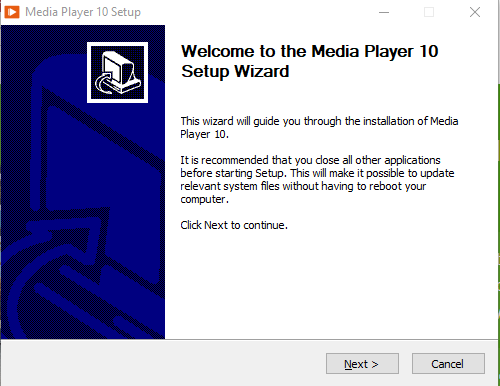
Mediaplayer10 Setup Screen
Opening Media files with MediaPlayer10
There are 2 ways for you to open up and play your video files. First, you can use the menu icon on the top left to open up the “Open File Dialog”

Mediplayer10 – open a video with the Open File Menu.
Alternatively, you can also drag and drop your file directly on top of the Mediaplayer10 interface.
Mediaplayer10 Controls
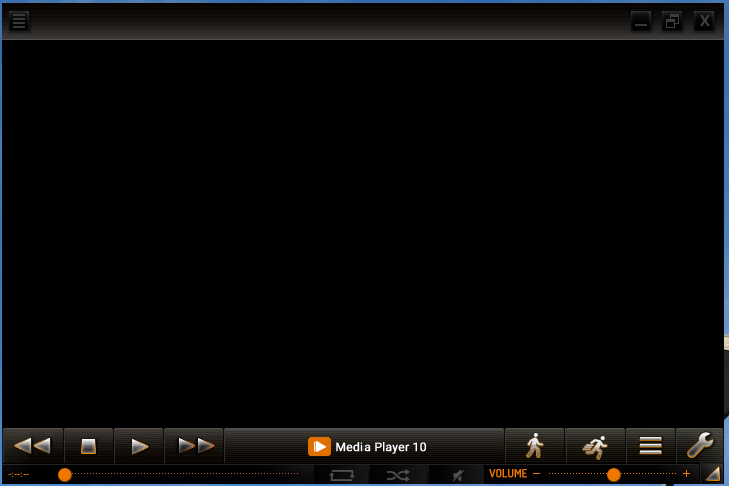
Mediaplayer10 Screenshot
You can do the following with Mediaplayer:
- Control playback of your video with backwards, forwards, stop, and play buttons at the bottom left.
- Increase or decrease the speed of playback (slow motion) by toggling the buttons depicting a man walking or running on the bottom right.
- Create a playlist of videos by clicking on the Icon depicting 3 horizontal bars at bottom right.
- Play DVDs by clicking on the wrench icon on the bottom right and selecting “Disc” on the Open Media dialog.